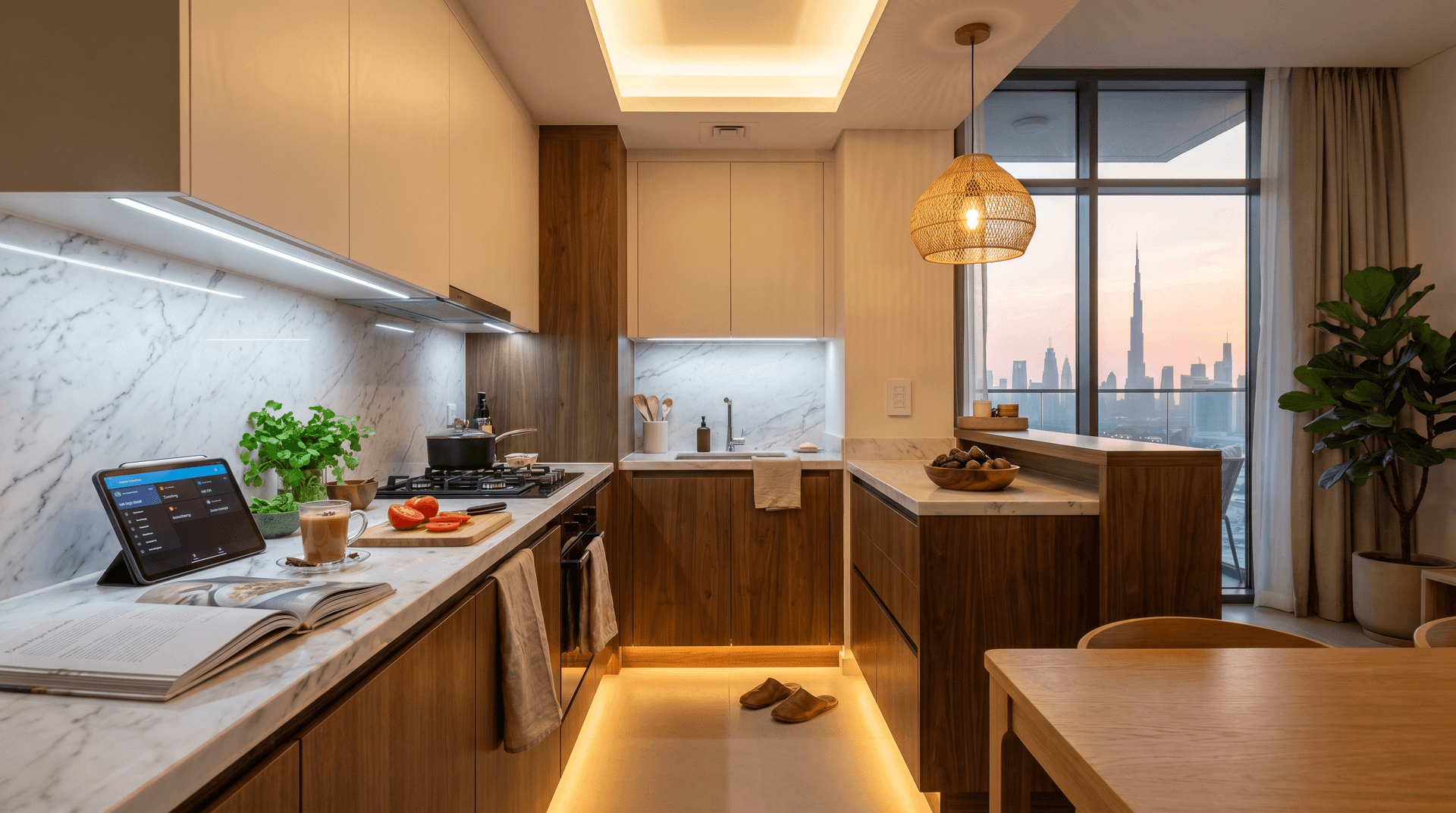
The kitchen in a Dubai apartment usually runs on one switch.
One cool-white ceiling panel, daylight-bright at 6,500 Kelvin, casting a shadow on the countertop every time you stand at it. When you cook dinner, the same panel blasts the dining area. When you want a glass of water at midnight, you flick it on and your eyes hate you for thirty seconds. When you pour karak at 4pm, the kitchen looks like a hospital corridor.
Your phone has scenes. Your kitchen has one switch.
TL;DR: A Dubai apartment kitchen needs four layers of light, not one: ambient overhead at 2,700K-4,000K, task under-cabinet at 4,000K and ≥90 CRI for prep, accent toe-kick for night navigation, and a dimmable pendant over an island or bar. A renter setup with smart bulbs and a Hue Bridge runs AED 1,400-2,200. A fitted Lutron Caseta install lands at AED 2,940-4,500. The countertop goes from shadowed to 580 lux. The cabbage looks like cabbage again.
What This Post Is About
This is the four-layer kitchen lighting playbook for a Dubai apartment. It covers what each layer does, why the developer's single ceiling panel is the wrong place to start, how the layers run on schedules and scenes through a Lutron Caseta or Philips Hue setup, three pricing tiers, the four things we will talk you out of buying, and a real Business Bay 2BR install where the countertop went from shadowed to properly lit on an AED 2,940 budget.
It is the architectural-layer companion to our smart cove lighting guide (which covers the ceiling perimeter) and the kitchen-prep counterpart to our Friday Night Dinner choreography piece (which covers the dining-side mood scenes).
Why the Developer Kitchen Is Lit Wrong
The standard Dubai apartment handover gives you one ceiling-mounted LED panel in the kitchen, typically a 30W or 40W flat panel pumping out 6,500K cool-white light. From a sales-handover photo at noon with no cabinets installed, it looks bright and clean.
The problem starts the day the cabinets go in.
When you stand at the countertop to chop tomatoes, your body is between the ceiling light and the work surface. The cabinet faces above you cast a hard shadow on the countertop. You are working in your own silhouette. The Illuminating Engineering Society recommends 500-750 lux at kitchen prep surfaces (Modern.Place IES kitchen lighting standards, 2026). A typical Dubai apartment kitchen measures 80-150 lux at the countertop when the cook is in position. You are prepping in less than a third of the light the standard calls for.
Worse, 6,500K cool-white light is what hospitals and labs use. It makes everything look clinical. A fresh tomato looks pale. Saffron looks orange-grey. Coriander leaves look blue-tinted. You bought decent groceries from Spinneys; the lighting is making them look like grocery-store reject-bin produce.
And the kitchen ceiling panel is wired to one switch that ALSO controls the open-plan dining area in most newer 2BR apartments. So when you are cooking dinner, the dining room is also blasted at 6,500K. The mood for dinner is set by the prep light. You eat under it. You wash dishes under it. You wind down under it.
One layer cannot do all of those jobs at once. That is what four layers fix.
The Four Layers Every Kitchen Needs
Professional kitchen lighting design is a four-layer stack, and each layer has one job (Cosmo Appliances kitchen lighting guide, 2025; Lutron layered lighting tips, 2024).
Layer 1: Ambient (overhead). This is the room-fill light. Goal: 300-500 lux across the floor space, no hot spots, glare-free. In a Dubai apartment kitchen this is the ceiling panel or recessed downlights, but the smart version is dimmable, tunable from 2,700K to 4,000K, and controlled by a dimmer or scene keypad. Not by a single on-off switch.
Layer 2: Task (under-cabinet). This is the work light. Goal: 500-750 lux on the countertop, no shadow when you stand at it. Under-cabinet strips do this because the light source is behind your body, not in front of it. The standard is 300-500 lumens per linear foot of countertop (Lumaz under-cabinet lighting guide, 2025). Color: 4,000K is the sweet spot for prep, bright enough to read, warm enough not to feel clinical. CRI must be 90 or higher so produce looks like produce.
Layer 3: Accent (toe-kick). This is the architectural detail layer. A thin LED strip mounted under the base cabinets at floor level. Color: 2,200K-2,700K, warm amber. Runs on a schedule or a motion sensor. Two jobs: it is a nightlight at 3am so you do not flick the overhead and blind yourself getting water, and it makes the cabinets look like they are floating, which photographs and shows like a fit-out three times the price. Toe-kick lighting adds a subtle glow and a floating effect to lower cabinets (CT Shower & Bath layered kitchen lighting guide, 2025).
Layer 4: Pendant or island (statement). This is only relevant if your kitchen opens onto a bar, island, or breakfast counter. A dimmable warm pendant at 2,700K. Its job is dinner: when you turn the task and ambient off and leave the pendant on at 60%, the dining bar reads as a small restaurant. This is the layer that does the heavy lifting in the Friday Night Dinner scene.
In our experience surveying Dubai apartment kitchens, four out of five have ZERO of these layers beyond the developer's single panel. The cabinet trough under the upper cabinets is empty. The toe-kick is dark. The pendant, if it exists, is on the same switch as the ceiling panel. The kitchen runs at one mood at one brightness.
Why Four Layers Beat One Brighter Bulb
The instinct, when a kitchen feels poorly lit, is to replace the ceiling panel with a brighter one or add a second downlight. This solves nothing.
A brighter overhead panel still throws your shadow on the countertop. You are still prepping in silhouette. The dining room still gets blasted when you cook. The 3am water glass still requires a flicked switch and thirty seconds of eye adjustment. Adding a second overhead doubles the wattage and doubles the glare on the same wrong vector.
Four layers work because each one has its own switch and its own job. Task under-cabinet runs alone when you are prepping at 11am, ambient stays off, no glare on the rest of the apartment. Ambient runs alone during family breakfast at 7:30am, soft 3,000K, no clinical wash. Toe-kick runs alone overnight from 11pm to 6am. 30% brightness, 2,200K amber, no one wakes anyone up. Pendant runs alone at 8pm dinner, restaurant lighting on the bar, the kitchen behind it dim.
This is not over-engineering. It is the same principle as your phone having multiple apps instead of one app that does everything badly. Each layer is one app. The kitchen runs them in combinations.
How Smart Control Changes the Stack
A four-layer kitchen on dumb switches is still a chore. You have four switches, you are flicking them up and down, you are remembering which one does what. After two weeks the toe-kick stays on all day, the pendant stays off, and you are back to using the ceiling panel for everything.
Smart control is what makes the layers run on their own. Three things change.
Scenes. Instead of four switches, one keypad button. Press Breakfast and ambient comes up at 50% 3,000K, pendant at 60%, task off, toe-kick off. Press Cook and task switches on at 100% 4,000K, ambient 80%, pendant 100%. Press Dinner and task drops off, ambient settles at 50% 2,700K, pendant holds at 70%. Press Goodnight and task off, ambient off, toe-kick at 10% 2,200K. The keypad sits next to the kitchen entry. Four buttons. The kitchen knows what time of day it is.
Schedules. The toe-kick comes on at 23:00, fades to 30%, stays on overnight, turns off at 06:30. The ambient warms from 4,000K morning bright down to 2,700K evening warm automatically as the day progresses, mirroring what happens with bedroom circadian lighting. The pendant powers on for dinner at 19:00 if motion is detected, and off by 22:30. The kitchen runs itself.
Cross-system handshakes. When the whole-home "Goodnight" scene fires from the bedroom keypad, the kitchen rolls into its own Goodnight, ambient off, task off, pendant off, toe-kick at 10%. When the smart AC kitchen zone pre-cools at 12:45 for lunch prep (cooking, the extractor, and bodies add 3-4°C to a closed galley), the kitchen ambient ramps to 80% 4,000K so you can already see what you are doing when you walk in.
This is what open-platform smart home control does at the kitchen layer. You do not get this from four dumb dimmers and a wall remote that vanishes after a fortnight.
The Renter Setup From AED 1,400
If you are renting and you cannot touch the wiring, the kitchen still gets four layers. They run on bulbs, plug-in strips, and a Hue Bridge instead of in-wall switches.
The shopping list lands at AED 1,400-2,200 total for a 2BR apartment kitchen:
- Philips Hue Bridge (AED 449 at Sharaf DG UAE)
- 2 Hue White Ambiance E27 bulbs for the existing ceiling panel sockets (AED 99-149 each at Sharaf DG UAE; the panel itself stays untouched, the bulb upgrade is the smart layer)
- 3 IKEA MITTLED LED 40cm-80cm worktop strips for under-cabinet task (AED 59-99 each at IKEA UAE, plug-in driver, dimmable, 2,700K warm, for renters the warm version is acceptable, even if 4,000K is technically better for prep)
- 1 generic dimmable smart LED strip 2 metres for toe-kick, 2,700K warm, motion-sensor or schedule (AED 150-250 at Amazon.ae)
- 1 Hue Smart Button or Tap Dial for scene control (AED 199-349 at Sharaf DG)
- 1 plug-in dimmable pendant for the bar if your kitchen has one (AED 250-400 from various, hardware not strictly smart, but the lamp socket can take a Hue bulb to make it smart)
What we have found is that the renter version sacrifices the in-wall touchscreen feel and the truly tunable 4,000K task light, but it gets you the four layers, four scenes, and the Goodnight roll-in. We have done this in two-week installs for Marina and JBR renters in their first month after move-in. The day they take down the strips at lease-end is the day they pack the Bridge and the bulbs into a shoebox and rebuild it in the next apartment.
This is the same logic as the rest of our renter-friendly playbook: the kit comes off the wall the day you move.
The Fitted Setup From AED 2,940
If you own the apartment or the landlord allows wiring changes, the four layers run on in-wall switches and dimmers. The control surface is a four-button Lutron Caseta Pico keypad mounted next to the kitchen entry, the kind of thing your hand reaches for without you thinking about it after a week.
Typical fitted install for a Business Bay 2BR closed galley kitchen with a breakfast bar:
- Lutron Caseta dimmer for ambient ceiling (PD-6WCL-WH on Amazon.ae AED 348.63), wired into the existing ceiling-panel circuit, retains the existing panel hardware
- Lutron Caseta dimmer for task under-cabinet, wired into the existing trough below the upper cabinets
- 3.6 metres of 4,000K CRI-95 dimmable LED strip in the under-cabinet trough (AED 450-700 supply, AED 250-400 install, 30-amp driver, fits the standard trough depth without modification)
- 3 metres of 2,200K amber LED strip at the toe-kick, motion-sensor activated overnight (AED 300-500 supply + install)
- Existing pendant retained, lamp socket upgraded to a Hue 2,700K bulb so it dims via the Bridge to match scenes (AED 99-149)
- Lutron Caseta Smart Bridge if not already installed from a previous Bayora room (AED 749 retail, often already on site from a bedroom or living-room install)
- Lutron Pico 4-button keypad at the kitchen entry, scene buttons mapped to Breakfast / Cook / Dinner / Goodnight (AED 349 per Bayora install quotes, matches noon.com UAE pricing)
- Install labor: AED 300-500 depending on Bridge reuse and existing trough cleanliness
Total: AED 2,940-4,500 depending on Bridge reuse and toe-kick run length. This is the install on the Business Bay 2BR we describe in the case study below.
The Honest Pricing Ladder
| Tier | Setup | Total AED | Who It Fits |
|---|---|---|---|
| Renter starter | Hue bulbs + plug-in MITTLED strips + Smart Button | 1,400-2,200 | Apartment renters, no wiring changes |
| Standard fitted | Lutron Caseta dimmers + under-cabinet trough strip + toe-kick + Pico keypad | 2,940-4,500 | Owners or renters with landlord OK |
| Premium fitted | Tunable in-wall Caseta + warm-dim CRI-97 strip + addressable toe-kick + Hue accent + dual keypads | 6,500-9,500 | Larger kitchens, open-plan with island, frequent hosting |
Bayora's Smart Home Starter lands at AED 3,000 installed for a similar single-room scope. A kitchen at the standard fitted tier fits inside that envelope, with the Pico keypad and toe-kick layer being what differentiates a Bayora install from a contractor adding a single dimmer and an LED strip.
The AED 6,500-9,500 premium tier is honest about what it adds: warm-dim instead of fixed-warm, addressable RGB strips IF the brief explicitly calls for it (which is rare and usually a mistake, see Skip-Buy below), and a second Pico keypad at the second kitchen entry on bigger open-plan layouts.
What Bayora Will Talk You Out Of
The honest-recommendation principle is the most expensive thing we sell. It costs us AED 1,500-4,000 of equipment per kitchen, every time, because we walk people back from setups that look great on a Pinterest board and stop being used after a month.
Skip 1: Full RGB cabinet strip behind the backsplash. AED 1,200-1,800 of addressable RGB strip running the length of your backsplash. You will never want pink eggs. The CRI on RGB strips tanks to 70-80 when they are in their "white" mode, which means produce looks worse than the developer's stock panel, not better. The "purple party kitchen" novelty wears off in two weeks. The lights stay off after the first month. In our experience installing for a Downtown apartment owner two months ago, the AED 1,400 RGB strip we declined to spec was confirmed unused at the 6-week follow-up.
Skip 2: Smart bulbs in a pendant + a smart switch on the same circuit. This is the most common mistake we see when clients self-spec. The smart switch cuts power to the smart bulb, the bulb forgets its schedule, the scene breaks. Either smart bulb OR smart switch, not both on the same circuit. If you want both control surfaces, run the smart bulb on an always-on wall switch and put the scene control on a Pico keypad next to the entry. That is what gets you the dim-down-from-anywhere experience.
Skip 3: AED 1,200-1,800 wall touchscreen for the kitchen. A wall touchscreen makes sense as a hub-of-hubs in a living room. It does not make sense for the kitchen. Wet hands, oily fingers, grease in the air, a screen that needs a phone-style precise tap. A Lutron Pico keypad costs AED 349, has four tactile buttons, works in the dark by feel, takes wet hands, and never needs charging. The keypad is the right interface for a kitchen.
Skip 4: Dual-color strip on a manual handheld remote. The remote vanishes inside a fortnight. You end up using whatever color was set last, and you stop using the strip. Strips need either a wall keypad, a schedule, or a scene-triggered automation. If a strip ships with a small handheld remote and nothing else, that is a strip designed to be abandoned. The IKEA MITTLED strips solve this on the renter tier by being directly dimmable from a wall panel or a Hue button.
A Business Bay Install, Honestly
A two-bedroom apartment in Business Bay, family of four, closed galley kitchen 8 square metres with a breakfast bar opening onto the dining area. Developer-spec lighting: one 6,500K LED ceiling panel, no under-cabinet, no toe-kick, no dimmer. Standard handover. The kitchen had been the family's least-liked room since move-in. Cabbage looked grey. The 2pm karak ritual ran under hospital lighting. The 9pm dish-cleanup blasted the dining room behind it.
The brief: four layers, scene control, kitchen runs itself, total under AED 3,500. The wife had been adding RGB cabinet strips to the cart on Amazon.ae for six months and had not pulled the trigger. We arrived for the survey expecting to pitch the AED 1,400 RGB strip. We did not.
The install, executed in one afternoon:
- Layer 1 (Ambient): Existing 6,500K ceiling panel kept. Behind the panel we wired in a Lutron Caseta dimmer (AED 348.63 supply) and replaced the cool-white driver with a 2,700-4,000K tunable driver matched to the panel size. The panel now ramps from 4,000K morning bright down to 2,700K dinner warm automatically.
- Layer 2 (Task): 3.6 metres of 4,000K CRI-95 dimmable LED strip mounted in the existing trough under the upper cabinets. Lutron Caseta dimmer on its own circuit. Cost: AED 580 strip + driver + install. Countertop reads 580 lux when standing at it, measured.
- Layer 3 (Toe-kick): 3 metres of 2,200K warm amber LED strip mounted at the base cabinet kick-board. Aqara P1 motion sensor at the kitchen entry (AED 129 at Modo Store UAE) plus a schedule: 23:00-06:30 at 30%, motion overrides to 60% during the day if needed.
- Layer 4 (Pendant): Existing pendant over the breakfast bar retained. Lamp socket upgraded to a Philips Hue 2,700K E27 bulb (AED 149 at Sharaf DG UAE), dims via the existing Bridge from the family's living-room install.
- Control: Lutron Pico 4-button keypad mounted at the kitchen entry. Buttons mapped to Breakfast / Cook / Dinner / Goodnight.
Total: AED 2,940. Below the AED 3,500 budget. The RGB cabinet strip was declined.
Six weeks in, the family reports: the wife has not flicked the ceiling panel switch directly once since the keypad went up. The Pico keypad has been pressed roughly 1,200 times (telemetry from the Bridge). The toe-kick runs every night and the family's 7-year-old now gets water at 3am without waking anyone. The cabbage looks like cabbage. The 9pm dish-cleanup runs on task light only, the dining room behind it dim, and the husband has started reading in the dining chair while she cleans up, something he had not done in the apartment before.
The husband, separately, said: "We almost installed the colour strip. I am glad we didn't."
A Day in the Kitchen, by the Scenes
The four layers are not the point. The schedules are the point. Here is what a typical Saturday looks like in the Business Bay install:
06:30. Coffee. Toe-kick has been on at 10% overnight. The wife walks into the kitchen for coffee. She does not touch a switch. The kitchen reads soft and warm. The kettle plug is enabled but not powered until she lifts it. She makes coffee in the dim. She does not turn on the overhead. She has not been blasted at 6,500K once at 6:30am since the install went live.
07:30. Family breakfast. The husband presses Breakfast on the Pico. Ambient ramps to 50% 3,000K. Pendant comes on at 60%. Task stays off. Toe-kick fades out. The kitchen reads warm, comfortable, lit, and not over-bright. Breakfast happens.
11:00. Snack. The 7-year-old presses Cook on the Pico because she is making toast. Task ON 100% 4,000K. Ambient 80%. Pendant 100%. The toaster does its thing. She presses Breakfast again when she is done. The kitchen returns to social mood.
13:00. Lunch cook. The husband presses Cook before he starts prepping. The smart AC kitchen zone has already pre-cooled the kitchen to 21°C because lunch is scheduled. The countertop reads 580 lux. He chops onions without his own shadow over them.
16:00. Karak. Ambient 60% 3,000K, task off, toe-kick at 30% warm. The kitchen at karak time reads like a small café. This is the layer combination that the family says they did not realize they had been missing for two years.
19:00. Dinner prep. Task 100% 4,000K, ambient 80%. The wife runs through prep at the brightness she needs.
20:00. Dinner serve. The husband presses Dinner on the Pico. Task off. Ambient 50% 2,700K. Pendant at 70% 2,700K over the bar. The kitchen retreats behind the pendant. They eat under restaurant lighting. The kitchen, behind them, is dim.
22:00. Wind-down cleanup. Task at 60% (enough to see plates), ambient 40% 2,700K, pendant off. The dishwasher loads. The wife is done by 22:30.
23:00. Goodnight. Whole-home Goodnight scene fires from the bedroom keypad. Kitchen task off, ambient off, pendant off, toe-kick at 10% 2,200K only. The kitchen disappears.
The household experience of this is not "I have a smart kitchen." The household experience of this is "I never think about the kitchen lighting." That is the only outcome that matters.
Where This Fits in the Whole Apartment
Kitchen lighting is one architectural layer in a four-layer apartment lighting plan. The other three layers are:
- The cove (ceiling perimeter), covered in the smart cove lighting guide. This is the indirect architectural layer that washes the ceiling and walls.
- The room scenes (living-room and bedroom), covered in bedroom wake/wind-down scenes, the living-room evening wind-down scene, and the Friday Night Dinner choreography.
- The hosting layer (Eid majlis scenes), covered in the Eid hosting majlis post.
The kitchen completes the picture. A complete Dubai apartment lighting build, installed over 3-6 months as budget allows, lands at AED 9,500-15,000 across cove + kitchen + bedroom + living-room scenes + hosting layer, with a single Lutron Caseta Bridge tying it together. That is a Smart Home Starter on the AED 3,000 entry point, expanded over 4-6 visits.
The kitchen is often where families want to start because it is the room they spend the most time in. The cove is the room where the upgrade gets the most "guests-ask-who-designed-it" notice. They are different rooms doing different jobs.
Frequently Asked Questions
Do I need to rip out my developer ceiling panel to make this work?
No. The standard 30W or 40W ceiling panel stays in place. What changes is the driver behind it (we swap for a tunable 2,700K-4,000K driver) and the switch in front of it (we replace with a Lutron Caseta dimmer or wire it through a Hue Bridge for renters). The panel hardware itself is fine, the cool-white-only fixed-brightness wiring is the problem.
Will any of this void my warranty or upset my landlord?
For renters: the bulb-and-strip setup involves no wiring. The IKEA MITTLED strips plug in. The Hue bulbs replace the existing E27 sockets in the ceiling panel. The toe-kick strip mounts with adhesive. Nothing is drilled, nothing is wired into the wall. At lease-end the entire setup comes off in 20 minutes and goes into a box. For owners and renters with landlord approval: the in-wall Caseta install is reversible, the original switch goes back if you ever want it to.
What is the cheapest way to get just the under-cabinet layer?
If the only thing you want is the task layer, IKEA UAE MITTLED LED 40cm or 80cm worktop strips (AED 59-99 each at IKEA UAE) plug into a wall socket, dim from a small inline switch, and give you 2,700K warm at the countertop. AED 200-400 total for a typical 8 square metre kitchen depending on cabinet length. This solves the shadow but not the scene or scheduling problem. It is the right starting layer if budget is tight.
Does smart lighting cost more on the DEWA bill?
No, the opposite. The base ceiling panel runs at one wattage all day. A four-layer dimmed setup runs each layer only when it is needed, at the brightness it is needed at. In our experience, a smart-controlled kitchen runs at 30-40% of the connected wattage on average across a day, compared with 100% for the always-on developer panel. Smart lighting reduces residential lighting energy by 20-40% on average through scheduling and dimming (Modern.Place IES lighting energy savings, 2025). The savings are a side effect. The point is the kitchen runs properly.
Can I add this to a kitchen that already has a gas hob and an extractor hood?
Yes. The four layers are independent of the hob, the hood, and the extractor. The under-cabinet strip mounts under the upper cabinets, separate from the hood. The toe-kick mounts at the base, separate from any appliance. If the extractor is on the same circuit as the ceiling panel (which it often is in developer-spec apartments), the Caseta dimmer controls the panel but does not affect the extractor, the extractor switch stays independent.
Where to Start
The honest start, if you have never done a smart-lighting build, is one layer at a time, over a few weekends, on the renter tier. Get the Hue Bridge and two Hue bulbs in your ceiling panel sockets. Get the Pico-equivalent or Hue Smart Button. Build two scenes (Breakfast and Goodnight) and live with them for a fortnight. Then add the IKEA MITTLED under-cabinet strips. Then add the toe-kick. By the end of six weeks you are at four layers and four scenes and you have spent AED 1,400-2,000 in total.
The honest start for owners is to call us for a single-room survey. We come, measure your kitchen, check your cabinet trough depth, check your panel circuit, check whether you already have a Lutron or Hue Bridge from an earlier install. We come back with a four-layer scope and a price. If your problem is solved by AED 2,000 of strips and a keypad, we will tell you that. We do not pitch the AED 9,500 build to a 2BR kitchen that needs four scenes and a toe-kick.
The Dubai grid is getting an AI Virtual Engineer this month that will run 1.9 million automated decisions a day before the building you live in gets a power signal. Inside your kitchen, the most automated thing right now is the kettle, and only because you remembered to fill it. The grid will run itself. So can the kitchen.
The ceiling panel cooks the cabbage grey. The countertop has been in your own shadow for two years. The 3am water glass blinds you. The dinner under prep-light is the only dinner you have.
A keypad fixes all four. Press it once. Press it again at dinner. The kitchen catches up.
Get a free consultation and we will tell you exactly what your kitchen needs, room-by-room, with prices upfront and the layers you can skip.
Ready to Get Started?
Get a free consultation and we'll recommend what makes sense for your situation.
Get Free Consultation