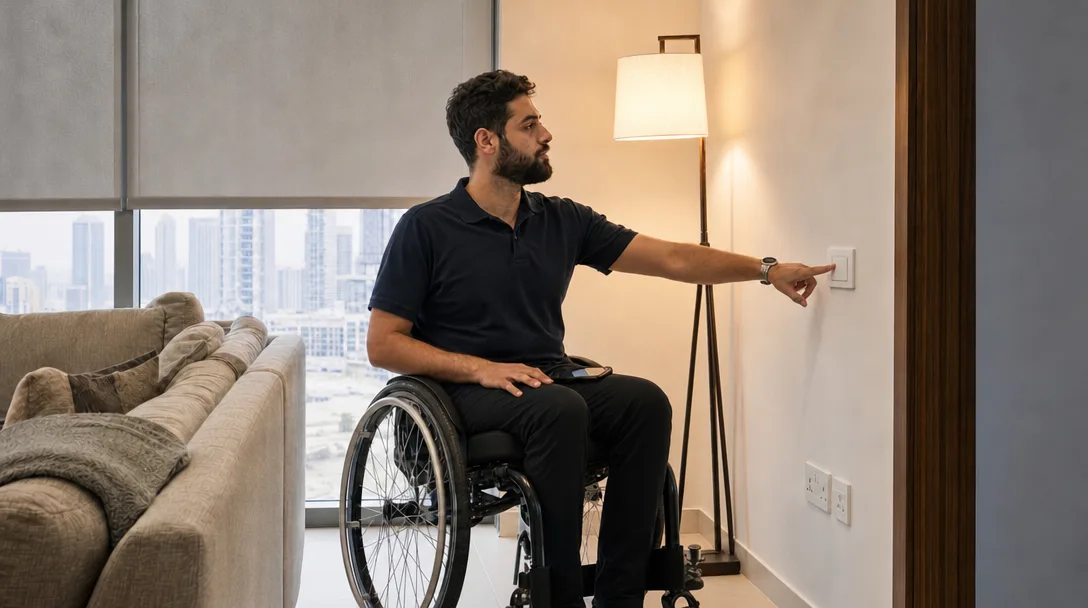
Go round the flat from the wheelchair (or, if you're setting this up for someone else, from a chair about the same height) and try everything you'd normally use in a day. Light switches, the AC panel, curtain cords, the intercom handset by the front door, the lamp plugged in behind the sofa. Write down each one you can't reach or can only reach by stretching.
Many items on that list can be fixed without moving a socket or switch, because a smart home lets you add a second control where you sit. Before anything is bought, show the list to an occupational therapist, who can say which kinds of control suit your hands, your reach and your chair.
A Switch Where You Can Reach It
Battery-powered wireless switches can be fixed at whatever height suits you. The Philips Hue dimmer switch, for example, mounts with the included adhesive tape and comes off its wall plate to use as a remote (Philips Hue). That's useful on a wheelchair tray or a bedside table. It runs on one CR2032 cell. It's made for Philips Hue lights, and Philips also lists Apple Home, Alexa and Google Home as compatible.
For lights on ordinary circuits, the first step is a relay module behind the existing switch, which we went through in counting smart switches for a Dubai flat. Once that's in, a wireless button anywhere in the room can turn the same light on and off (through a hub, for most brands), and the switch on the wall keeps working for everyone else. Fitting the module is a licensed electrician's job, and in a rented flat the landlord needs to agree first.
If you'd rather nothing ran on batteries, battery-free switches power themselves from the press, though their message has to reach a receiver, and through reinforced concrete that can mean one wall at most.
Avoid smart bulbs on a circuit someone else switches off at the wall. If the wall switch is off, the bulb can't hear your button or your voice, and you're left waiting for someone to come and switch it back on.
The AC Without the Wall Panel
If your AC is set from a wall panel you can't reach, a smart thermostat or a smart AC controller puts its settings on your phone and on a voice assistant, so you can turn the bedroom down a degree from bed without reaching for anything.
A schedule can save you more reaching than voice does. Set the bedroom to cool before you usually go to bed and ease off once you're up, and you won't need to touch anything most days.
Curtains and Blinds You Don't Have to Pull
Curtains and blinds can be among the hardest things in a flat to reach from a chair. They often hang behind a sofa or across the far side of a bed. A motor works them from a button, the phone or your voice.
Renting? A battery motor slides onto many existing roller blinds with no wiring, and our comparison of battery, hardwired and solar blinds covers which suits which window.
The Front Door and the Lobby Buzzer
By the front door there are usually two things to reach: the lock and the building intercom handset.
If you can't get to the intercom handset in time, the delivery driver gives up and the cleaner waits in the lobby. There are ways to make the building intercom ring your phone instead, and they depend on the system your building has, which we covered in smart intercoms for Dubai apartments. Note the make on the handset before you ask building management, because the options depend on it.
A smart lock lets you open the door from the phone when someone you're expecting arrives, and lock it from the wheelchair once they've gone. Keep a key or a keypad as well, because a flat lock battery shouldn't leave anyone locked out. Our guide to smart locks for Dubai apartments covers what renters can fit.
Opening the door itself is a separate question. A heavy front door may need a powered opener, and Disability Support Guide suggests asking whether automated doors would mean widening doorways first. A powered opener needs your landlord and building management to agree before it's ordered.
Plugs Behind the Furniture
Floor lamps, fans and the TV are usually plugged in low behind something heavy. A smart plug between the socket and the plug puts that switch on your phone and voice assistant. Use them for lamps and fans. Leave anything that heats, like an iron or a heater, on its own switch, where you can see it while it's on.
When Your Hands Get Tired Too
If using a phone is also hard work, the phone has its own settings for that. On an iPhone, Voice Control lets you work the screen with spoken commands like "tap" and "swipe", and Switch Control lets you use adaptive switches, head movements or simple sounds instead of touch (Apple accessibility). Either one works across apps, so it reaches the Home app and the apps your devices came with.
On an Echo Show, Tap to Alexa lets you use Alexa by tapping the screen instead of speaking (About Amazon UK).
A home you run from a phone leans on the Wi-Fi, and on the phone staying within reach. A phone that slides off the tray can leave you as stuck as an outage. For the main lights, the front door and the AC, keep a second way in that needs neither the phone nor the internet and that you can reach from where you sit. A wireless button paired to a hub in the flat can keep the lights going, and a lock keypad and the AC's own remote, if it has one, keep working too (the remote talks straight to the indoor unit). We went through the rest in what still works when the internet is down.
Questions for the Occupational Therapist
Disability Support Guide lists questions to take to an occupational therapist, including whether the technology will mean changes to your home and whether you'll be able to use it alone. Once things are fitted, do the walk-round again from the chair. Anything still on the list is the next job.
Send us the list too. Tell us which controls you can't reach, and we'll suggest what to fit first.
Ready to Get Started?
Get a free consultation and we'll recommend what makes sense for your situation.
Get Free Consultation