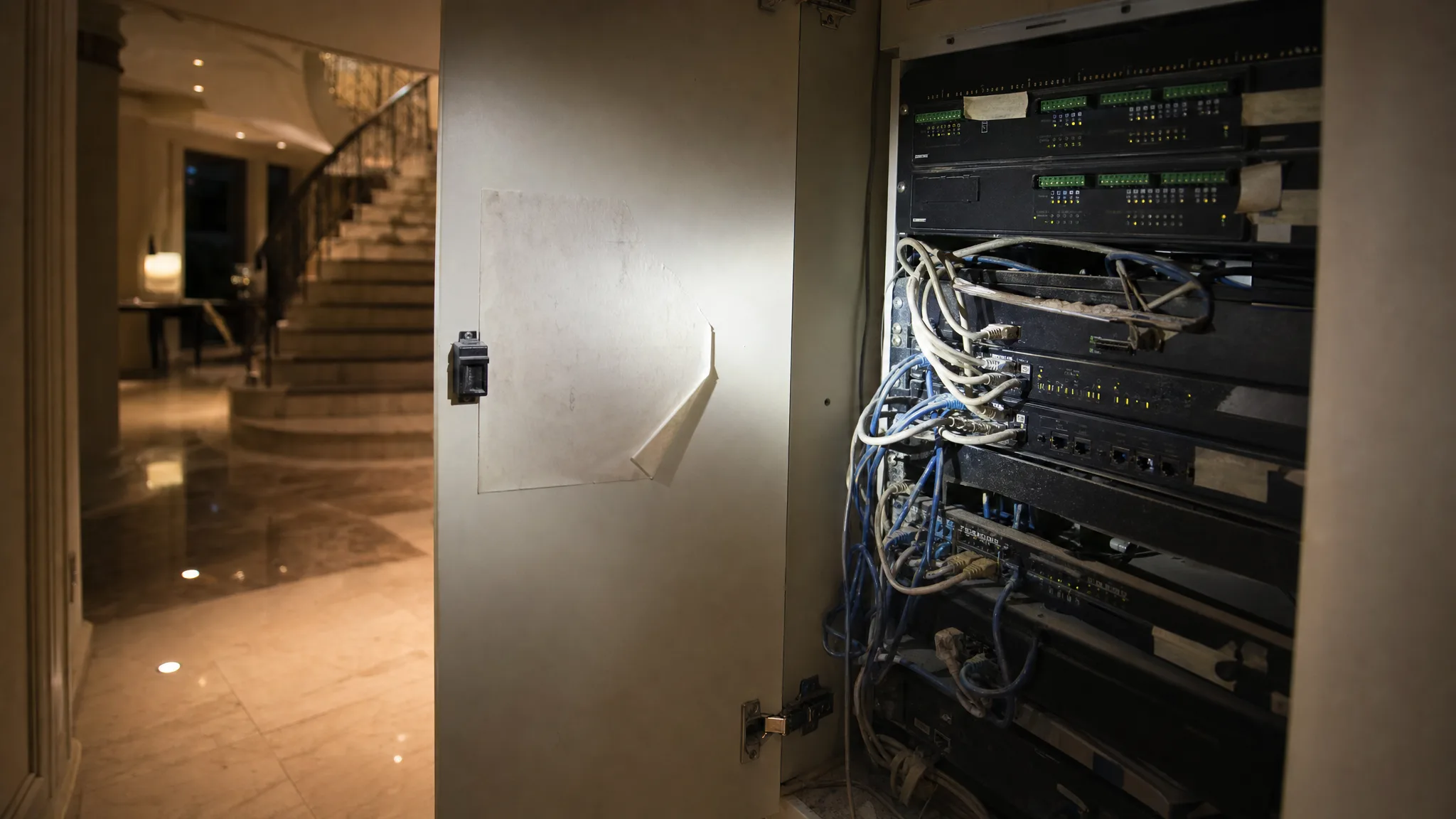
There is a sticker on the inside of the cupboard door. A company name, a mobile number, a date from four years ago. You call the number. It rings out, twice, and then it stops ringing at all.
Meanwhile the lights still come on at seven, because the system in that cupboard is doing what it was told to do in 2022 and has no way of knowing anything has changed. It will keep doing that until the day something breaks. Then you find out that a smart home comes with a relationship attached to it, and that relationship ended without telling you.
TL;DR: Check first whether the company still legally trades. A live one owes you maintenance and spare parts under UAE law; a dissolved one owes you nothing you can enforce. Then find out which platform you have and who holds its keys. Control4 lets you change your own registered installer, but only if yours handed the system over first.
This happens in two ways in Dubai. Either the company that built your system stopped answering, or you bought or rented a home that already had one and the previous occupant left you a light switch that does something strange and no explanation. The second version is the harder one, and it is worse, because you never had the relationship to lose.
Both end in the same place: a cupboard full of hardware you own and cannot administer.
Start With Whether the Company Still Exists
Before anything technical, spend ten minutes finding out whether there is still a company at the other end. This changes what you are owed, and not only who you call.
The UAE government portal collects the emirates' licence lookups in one place, and for Dubai it lists Dubai Economy and Tourism's own licence search (U.ae, 2026). Search the trade name from your invoice or the sticker. If you moved in and there is no sticker and no invoice, ask the developer's handover team or the building management who did the fit-out. You will get one of three answers, and each one sends you somewhere different.
The licence is active and the company is simply ignoring you. This is the best case, because they still have obligations and there is a body that enforces them. Go to the next section.
The licence is expired or cancelled. There is nobody to complain about. Skip to the technical half of this post, because your problem is now entirely about what you hold.
You cannot find the company at all, only an individual. If the work was done by a person rather than a licensed business, the consumer-protection regime below does not reach them, and there is usually no documentation either.
One more thing, while you have the paperwork out: find the invoice, for the model numbers on it rather than the amount.
What the Law Still Asks of a Supplier That Is Trading
A supplier that still holds a licence owes you warranty work, spare parts and after-sales service on a clock. Seven days for parts in regular demand, fourteen for parts that are not. If a repair under warranty runs past seven days, you are owed a working substitute in the meantime unless the fault was caused by something you did.
That comes from two places. Federal Law No. 15 of 2020 on Consumer Protection requires a supplier to implement all warranties, provide the required spare parts and maintenance, replace the good or refund it, and commit to after-sales service within the specified time limit (Ministry of Economy and Tourism, 2020). Article 15 of the same law requires the supplier to write that commitment into the contract, with a time limit that runs from the moment the fault appears. The day counts come from the executive regulation, Cabinet Decision No. 66 of 2023 (Ministry of Economy and Tourism, 2023), which also carries the substitute rule.
If quoting those at the company goes nowhere, consumer complaints run through the Ministry of Economy and Tourism, whose call centre and customer protection line is 800 1222, and in Dubai through Dubai Economy and Tourism's consumer complaint channel.
None of this survives the company, because there is nobody left to enforce it against. That is why the licence check comes first and why the rest of this post assumes the worst answer.
Work Out What You Are Holding
You are looking for three things, and you can find all of them with a phone torch and the camera.
Start with the brain. Somewhere there is a box that is not a router and not a switch. It will have a brand on it: Control4, Crestron, Lutron, an unbranded KNX rail of small modules clipped side by side, a small computer running Home Assistant, or a hub the size of a paperback with an app name you half recognise. Photograph the label, both sides, including the small print.
The labels. Look for anything handwritten or printed on the modules, the rack shelves, the back of the panel door. In a KNX cupboard, every module on the rail is a device with its own address, and any labelling at all is worth more to the next installer than the hardware itself.
The accounts. Open every smart home app on every phone in the house and check who the owner of each one is. If it is an email address at the installer's domain rather than a family address, you have found the real problem, and it is not a hardware problem.
We have had enquiries where the brand and the age of the existing system were simply unknown at the start, and that is the first thing anyone pricing the work has to establish. A torch and a phone camera settle it before you talk to anybody.
Control4: You Can Change Your Own Installer, and There Is a Catch
You can move a Control4 system to a new company yourself, from your own account, without anyone's permission, and the condition attached to that is the one that traps people.
Snap One's own documentation states it plainly: "Control4 customers have the ability to change their integrator using customer.control4.com" (Snap One, 2026). You log in, go to My Account, Smart Home Pro, and click Change My Pro. You confirm that you understand you will have no support until you find someone new, and your system moves to a holding account until a new registered installer accepts it. Your claimed devices and their configuration go across with it.
Then the catch, in the same document, one line under the heading: "A customer cannot change their Smart Home Pro unless the project has been handed off to them in OvrC." OvrC is the platform professionals use to remotely manage, configure and troubleshoot the devices on a client's network (OvrC, 2026). Handing the project off inside it is a step your installer either took or did not, and you had no way of knowing which.
If they did not, the button that would set you free is the button you cannot press, and the page that describes the process does not describe a route back from that side. So this becomes the first question you put to any company you approach: have you moved a Control4 system that was never handed off, and how did it go. A company that has done it before will tell you straight away. One that has not will tell you that too, in the way they answer.
Two more details from the same page that people get wrong. A transfer does not reset the usernames and passwords on individual devices, so anything the old installer set locally stays set locally. And notification settings do not travel, so whoever was getting the alerts before is a separate question you have to close yourself, the same way you would when handing over a smart home to a new owner.
Our guide to Control4 in Dubai covers what the platform does well, which is not the same as who can service it.
KNX: No Company Owns Your Devices, but Someone Owns the File
A KNX professional who has never seen your house can open your installation, because everyone who works on it uses the same software. As the KNX Association puts it, "ETS is the single software tool used to plan and configure KNX projects" (KNX, 2026). KNX is an open standard with more than 8,000 certified devices from over 500 manufacturers, and that tool is the same one your original installer used.
Nobody can read your installer's mind, though. A KNX project is held in a project file that records every device, address, parameter and function in the building. Without it, the devices still work exactly as they were programmed, and nobody can see why. The usual recovery path is to go round the installation device by device, reading each one back over the wiring that links them, and rebuild the project from what is found.
Where a project uses KNX Secure, that gets harder in two ways at once. The first is the password. ETS will not open an encrypted project file without it, and ABB's own KNX Secure guide is blunt about the consequence: neither the KNX Association nor the device manufacturers can open an encrypted project, reset a forgotten password, or retrieve any data from the file (ABB, 2026).
The second is the certificates. The same guide explains that every Secure device ships with its own, usually on a removable label, and that it is needed the first time the device is commissioned and again if the device is ever factory reset. So whether a Secure installation can be recovered without the password and the certificates is the first thing to ask whoever you bring in, and it is a harder question than it looks.
A file you cannot open is not a backup.
If It Is Not Control4 and Not KNX
Whatever else is in that cupboard tends to sit in one of three shapes.
On some platforms a manufacturer holds the record of who services your system, the way Control4 does, and the answer comes from the manufacturer rather than from you.
On others the system is an account in an app, in which case the question is which email address owns it.
And on others it is gated by a configuration file and the software that opens it. That is the same shape as the KNX problem above, so the questions to ask are the same two: who has the file, and is the tool that opens it one your new company can get hold of.
Which of the three you are in decides who you call first.
What a New Installer Actually Needs From You
Bring these to the first conversation and it goes faster. It also tells you something about the company, because a company that does not want any of this has decided not to look, and a company that has not looked can only quote you for starting again.
- Photographs of the equipment cupboard, the labels and the back of any wall panel.
- The original quotation or invoice, for the model numbers and the install date.
- Any project file, backup or configuration export, whatever it is called on your platform, and on a KNX Secure system the device certificates too.
- The admin login for every app the house uses, and the email address that owns it.
- A short list of what still works and what does not, written as sentences rather than as faults. "The hall lights come on at seven and I cannot change the time" is more useful than "lighting broken".
Be ready for an honest answer you will not enjoy. Some systems are straightforward to take on and some are not, and documentation decides that more than age does. A ten-year-old KNX installation with a project file can be opened and changed. A three-year-old proprietary system nobody can log into has to be understood from scratch first. We would not pretend to know which of those two you have before seeing the cupboard, and a company that tells you it knows without looking is guessing.
What Stops This Happening to the Next System
What protects you is whether the keys to your home sit somewhere you can reach. The brand on the box has very little to do with it.
On Home Assistant, which is what we build on, the whole system runs on a computer in your own house. As the project's own documentation puts it, "Home Assistant runs on your own hardware, in your own home, and your data stays with you" (Home Assistant, 2026).
There is no registered installer on anyone's books and no holding account, so there is nobody to ask. Whoever has the admin login and a backup is the administrator, and on this platform there is nothing stopping that being the owner from the day the work finishes. The comparison with KNX is worth reading if you are deciding between the two, and our Home Assistant page covers what it does in a Dubai home.
For the devices themselves, there is a standard called Matter that newer smart products can carry, and it changes something that used to be a trap. A Matter device can be signed in to more than one app at a time: the standard lets you "connect your smart devices to multiple apps and ecosystems locally, securely, and simultaneously" (Connectivity Standards Alliance, 2026), so a device is not hostage to whichever app it was first paired with. That does nothing for the legacy system already on your wall, but it means the next thing you buy does not have to repeat the mistake.
Three questions, then, before anyone touches your walls again. Who owns the admin account when the job is finished. What file or backup do I get handed, and can I open it. If you disappear, what does the next company need. We have made this argument on this site before, as advice for people about to choose a company, and the same three questions decide what your support arrangement is actually worth.
Frequently Asked Questions
My smart home installer in Dubai has stopped replying. What can I do?
Check whether the trade licence is still active through Dubai Economy and Tourism's licence search. If it is live, write to them citing the spare-parts and maintenance obligation, with a date you expect a reply by, then escalate to the Ministry of Economy and Tourism on 800 1222. If it is cancelled, start recovering access instead.
Can another company take over my existing Control4 system?
Yes, if the project was handed off to you. You change the registered installer yourself from customer.control4.com, and the new company accepts the system with your claimed devices and their configuration intact. If the original installer never handed the project over, you cannot start that process from your side, and the documentation does not describe a self-service route from there.
What is a KNX project file and why does everyone ask for it?
It is the record of every device, address and function in a KNX installation, created in the ETS software the whole industry shares. The hardware works without it, but nobody can change or diagnose anything efficiently without it. It can often be rebuilt by reading each device back over the KNX wiring, and it is password protected where KNX Secure is in use.
I moved into a Dubai villa with a smart system nobody explained. Where do I start?
Photograph the equipment cupboard and every label in it, find out which apps the house uses and who owns those accounts, and look for a handover document from the developer or the previous owner. Until you know the platform and who holds the admin account, any number anyone puts on the work is a guess.
Is it better to take over an old system or replace it?
Documentation decides it more than age does. If the configuration exists in a file someone can open, the work is to take the system over. If it does not, the work starts with reading the system back off the hardware to find out what it does, and that is time before anything improves.
Find Out What You Have Before You Decide Anything
If you are looking at a cupboard you did not fill, the useful first step is an assessment rather than a quote: what platform is in there, who holds the keys to it, and what could be recovered.
That is a conversation we are happy to have without an obligation attached. Send us the photographs from the cupboard and whatever paperwork you can find, and we will tell you what platform you are looking at and who holds the keys to it, including when the honest answer is that it is worth keeping and there is nothing here for us to sell you.
Book a free consultation and bring the torch photographs.
Ready to Get Started?
Get a free consultation and we'll recommend what makes sense for your situation.
Get Free Consultation