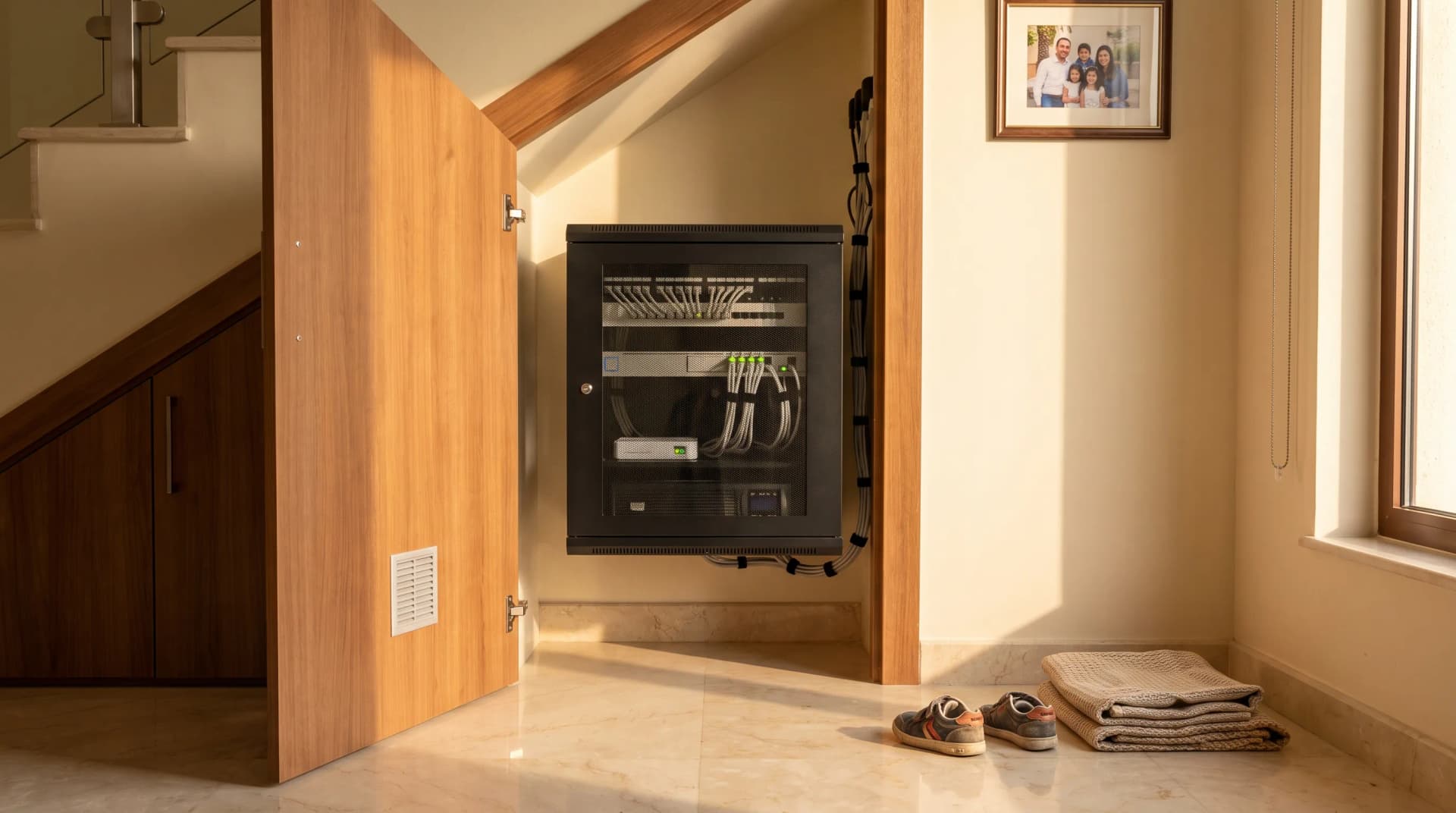
Your villa can dim the lights for Friday dinner, cool the upstairs before bedtime and show you the gate camera on your phone. All of that runs through a cupboard most owners have not opened since handover. When a camera freezes or the office Wi-Fi crawls, the cause often sits in that cupboard, in the network rack, or in the spot where a rack should have been.
In Dubai, two details decide whether a rack keeps working: heat, and how each cable is finished at its ends.
TL;DR: A network rack is where every data cable in a villa ends: the fibre box, the router, a switch that powers cameras and access points over the same cable, and a patch panel. In Dubai, keep it inside the air-conditioned part of the house, size it with room to grow, and have every cable tested at gigabit before handover.
What a Network Rack Does in a Villa
A network rack, sometimes called a network cabinet, is a small enclosure where every data cable in the house finishes. Fibre comes in from the street and the router turns it into your home network. A switch, the box with a row of ports, hands that network out to each room. The cables from each room land on a patch panel, a strip of numbered sockets, so any one of them can be plugged in, moved or tested. Ceiling Wi-Fi access points, cameras and the smart home hub all connect there. Having every run end in one cabinet is what lets a fault be traced from one place instead of room by room.
Where the Rack Should Live
The rack belongs where the cables can reach it and the air stays cool. Those two needs can pull in different directions, because the fibre arrives wherever the telecom box was placed during construction, and that spot was chosen for the street connection rather than for your equipment.
On one villa design we drew up, an existing rack beside the main entrance already held the network cabling, and the plan kept the router, switch and patch panel there. On a recent villa rewire, every access-point and camera cable already ended in a closet by the fibre entry, and the plan moved them all to a new central rack with one new cable back to that closet. Both approaches work. The deciding questions are how far each cable has to travel, and whether the cupboard is inside the cooled part of the house.
A garage, a roof room or an outdoor plant cupboard is the wrong answer in Dubai, for reasons the next section puts numbers on. A cupboard under the stairs is often fine, as long as some air can move through it.
Heat Is the Dubai Problem
Network equipment has a temperature ceiling, and a Dubai summer goes past it. Ubiquiti's datasheet for its UniFi PoE Switch line rates five of its six models for an operating temperature of -5 to 40°C (Ubiquiti UniFi PoE Switch datasheet). National Centre of Meteorology data put the UAE's average August maximum at 48°C across 2003 to 2016 (Gulf News, 2018). Any space that follows the outdoor temperature, like an uncooled garage, is the wrong home for a switch rated to 40°C.
Inside an air-conditioned villa, the heat comes from the equipment itself, and a closed cupboard traps it. The same datasheet lists a 24-port model's own draw at up to 30 watts before it powers a single camera, and the router, the fibre box and a battery backup add their own. Every watt of it ends up as heat, and a solid door with no air movement holds on to it.
Keep the rack inside the cooled part of the house, and give its cupboard a vented or perforated door. Then add a small temperature sensor inside the cabinet, so your phone warns you if the cupboard starts creeping up, well before the equipment reaches its rated limit.
Sizing: 12U or 18U
For a villa with ceiling access points and several cameras, plan around an 18U wall cabinet rather than a 12U one. U is the rack's unit of height, and villa racks are often slim cabinets fixed to the wall rather than floor-standing towers.
The smaller size is easy to outgrow before install day. We have had an owner check the equipment they planned to put in against a 12U plan, find it would not fit, and move to 18U before anything was ordered. The cabinet on that final quote was 18U tall and 450 mm deep, a slim wall-mount unit, and the difference between the two sizes on the quote was under AED 100.
So choosing the smaller cabinet to save money is rarely worth it. Cables get bent hard to fit, the door struggles to close over them, and there is less room for air around the equipment. Leave three or four empty units for whatever you add next.
Four Pairs, and Why a Cable Settles at 100 Mbps
Every Cat5e or Cat6 network cable has four pairs of wires inside it. Gigabit needs all four, while the older 100 Mbps standard gets by on two. Fluke Networks, which makes the testers installers use, puts it in one line of its test documentation: "1000BASE-T and above requires all four wire pairs" (Fluke Networks).
That detail explains a fault owners notice without knowing why. If one of the two extra pairs is badly terminated, the link can stay up and settle at 100 Mbps, so the link light stays on and nothing looks obviously broken. The Wi-Fi from that access point tops out well below what it should, and the cable is the last thing anyone suspects.
We have found this on our own snag lists: an access point stuck at 100 Mbps, matching the two-pair pattern. Before you sign off an install, ask for the link speed of every run, and treat anything below gigabit as unfinished work, whoever did the wiring, us included.
PoE: One Cable for Data and Power
Power over Ethernet, or PoE, lets one cable carry both the network and the electricity a device needs, so a ceiling access point or a camera needs no socket of its own. Devices come in power classes. Basic PoE (802.3af) delivers 15.4 watts from the switch, and PoE+ (802.3at) delivers 30 watts, which suits "PTZ cameras, high-speed wireless access points (WAPs), and video IP phones" (Phihong). PTZ means a camera that can pan, tilt and zoom.
Two checks follow for a villa. Each port has to match the class of the device plugged into it. And the switch has one power budget shared across every port, so every camera and access point has to fit inside it with room to spare. If you are planning cameras around a villa, count their power needs before anyone chooses the switch. Our home security service scopes the two together for that reason.
Keep Power and Data Apart
Mains power cables next to data cables can add electrical interference, so installation standards set a gap between them. For a villa rack, the European standard BS EN 50174-2 asks for very little. As Excel Networking's technical note on the 2009 edition sets it out, ordinary unshielded data cable needs about 20 mm from one to three power circuits when nothing divides them, and zero inside solid metal containment. No gap is required at all for single-phase supplies of 32 A or less with their wires sheathed together, in an ordinary indoor environment (Excel Networking technical note).
So the reason to keep them apart inside the cabinet is mostly practical. Power leads down one side and data down the other means you can see which cable is which, and a fault can be traced without unpicking a tangle.
What It Costs, and When You Do Not Need One
On a recent villa job, the structured cabling section came to about AED 6,000 with the cabinet included. That covered Cat6 cable, conduit and trunking, wall outlets, power at the rack, and brackets and conduit for the camera positions, with the cameras supplied by the owner. The cabinet was the smallest part of it. Most of the money went on running and finishing cable.
That figure is one section of a larger job. Our whole-home automation projects run AED 10,000 to 50,000 depending on scope, which is why it pays to read a smart home quote line by line.
Plenty of homes do not need a rack. A rented apartment with mesh Wi-Fi and a handful of wireless devices is better served by sorting out the router, which our guide to why Wi-Fi drops smart devices walks through. A rack makes sense when you own the walls and the house has ceiling access points, several wired cameras, or a wired control system of the kind we compare in wired vs wireless smart homes and the KNX server guide.
What to Ask Before Anyone Drills
A few questions sort a careful installer from a quick one. Where does the fibre enter the house, and how will the cable get from there to the rack? Is the cupboard inside the air-conditioned part of the villa? Will every run be tested at gigabit and the results shared with you at handover? Does the switch's power budget cover every camera and access point with headroom? Will the patch panel be labelled, so the next person can tell the office port from the garage one?
If an answer comes back vague, ask again. An untested cable end or an unlabelled patch panel stays hidden behind the cupboard door until an access point drops to 100 Mbps.
Frequently Asked Questions
Can I use mesh Wi-Fi instead of running cables in a villa?
In a smaller home, often yes. Mesh units pass traffic to each other over the air, and every concrete wall and floor between them costs signal. In a multi-storey villa, running a cable from each access point back to the rack removes that weak link, which is why wired access points are the usual choice when the walls are open.
Does a network rack need a battery backup?
It is worth having. A small UPS, an uninterruptible power supply, keeps the router, switch and cameras running through a brief power interruption instead of letting the whole network restart. We recommended one in a villa rack design that grouped the router, the main switch and two audio amplifiers in the same cabinet.
How can I tell if a cable is only running at 100 Mbps?
Open the app for your router or switch and look at the port list, which shows the link speed of each connection. A laptop plugged into a wall outlet also reports its link speed. Anything that should run at gigabit, like an access point or a computer, and shows 100 Mbps deserves a look at the cable ends.
Can a network rack go in a bedroom cupboard?
Only if the switch is quiet. Smaller switches can be fanless: in Ubiquiti's UniFi PoE Switch datasheet the 8-port model is fanless, while the 16, 24 and 48-port models list fan levels. A fan-cooled switch can be heard in a quiet room, so put the bigger equipment somewhere nobody sleeps.
Tell us about your villa and we will map your cable runs and pick the right cupboard for the rack.
Ready to Get Started?
Get a free consultation and we'll recommend what makes sense for your situation.
Get Free Consultation