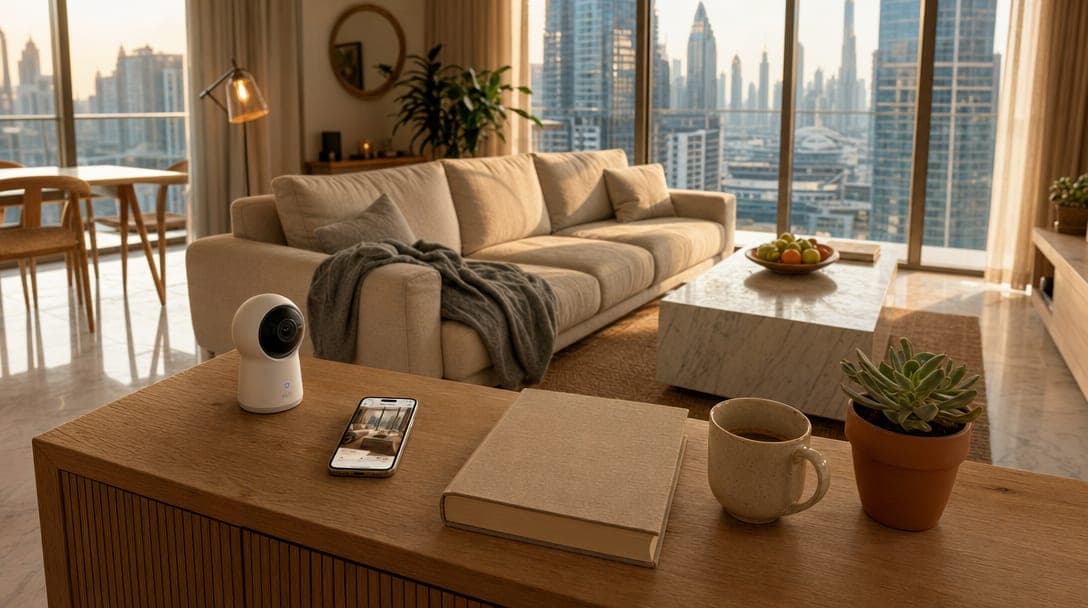
Most people in Dubai who buy an indoor camera are not afraid of burglars. They are at the office and want to see whether the housekeeper showed up. Or they are at a wedding and want to check if the dog has eaten the sofa. Or the kids are home with the nanny on a school day and they want a quiet glance at the living room every couple of hours.
TL;DR: A good indoor security camera for a Dubai apartment costs AED 150 to AED 500, plugs into a single socket, and works in 10 minutes. The Aqara G3 (AED 449) and Eufy Indoor Cam C220 (AED 199) are the honest picks for most renters. Place them only in shared living spaces, never bedrooms or bathrooms. Disable cloud storage if you can, and use a guest WiFi network so the camera never sees the rest of your devices.
This is the calmer half of home security. Door locks and outdoor doorbells handle the perimeter. Indoor cameras handle the day-to-day questions you have anyway, which is why they matter most in a Dubai summer when the home is full rather than empty. With Dubai schools running distance learning into a fifth straight day this week and a generation of parents working from cafes and co-working spaces while kids are home, the use case has gotten more domestic and less dramatic. The good news is that the gear is now cheap, wireless, renter-friendly, and good enough that a AED 200 camera does what a AED 2,000 system did in 2018.
The bad news is that almost no one places them correctly, almost no one secures them, and almost no one knows what UAE law says about them.
Why Indoor Cameras in Dubai Are a Different Conversation Than Outdoor
The reason for an indoor camera in a Marina or Downtown apartment is rarely the same as the reason in a suburban villa. In an apartment, the front door is already covered by a building intercom and a hallway under building CCTV. The risk profile is different: the things you want to see are inside the apartment, not outside it. Housekeeper arrived on time. Dog is okay. Kid is doing homework, not watching YouTube. Delivery driver dropped the box inside the door, not in the hallway.
That changes the buying criteria. You do not need 4K with floodlight integration. You need a small, quiet, well-lit camera that lives on a console table or shelf, sees one room, and shows you a clean feed on your phone in two seconds. Smart home security in the UAE is now a US$1.85 billion market projected to grow at 15.9% CAGR through 2030, and most of that growth is exactly this category of small indoor units.
In our experience, the families who get the most out of an indoor camera in Dubai are the ones who treat it like a glanceable widget on their phone, not a forensic tool.
UAE Law and Indoor Cameras at Home
The short version: you can install indoor cameras in your own residence, but there are hard lines you cannot cross. Cameras are forbidden in bedrooms, bathrooms, and any space where someone has a reasonable expectation of privacy (Al Tamimi & Company, 2024). Cameras must not face neighbouring units, and audio recording without consent is illegal under the UAE Personal Data Protection Law (PDPL).
For most apartment owners and renters, SIRA approval is not required because the unit is your private residence and the camera is not connected to common-area surveillance. SIRA's 4K standards and 31-day retention rules apply to commercial buildings and shared facilities, not your living room (SIRA technical specifications).
What this means in practice: living room, kitchen, hallway, entry foyer are all fine. Bedrooms and bathrooms are a hard no. If you have live-in staff, they need to know cameras exist and where they point. A camera covering a maid's room is a legal problem; a camera in a shared living area where staff also work is not. We cover the wider setup for households with live-in help separately, including door access and app permissions.
Picking the Right Indoor Camera for a Dubai Apartment
Three brands are stocked locally on Amazon.ae, Noon, and Jumbo Electronics in 2026, and they cover almost every realistic use case. Skip anything from an unfamiliar brand on a deep discount: those are the units the UAE Cyber Security Council flagged as part of the 70% of smart home devices vulnerable to cyberattacks (Khaleej Times, 2025).
Aqara Camera Hub G3 (AED 449) — Best Overall
2K resolution, pan-and-tilt with a 360-degree field of view, AI face recognition, works with Apple HomeKit Secure Video, Alexa, and Google. The bonus is that it doubles as a Zigbee hub, so the same device that watches your living room can run your motion sensors and contact sensors. One AED 449 unit replaces what used to be a camera plus a hub plus a subscription.
Eufy Indoor Cam C220 (AED 199) — Best Value
2K, pan-and-tilt, no monthly fee, microSD storage up to 128GB on the device itself. AnkerDirect AE sells it on Amazon.ae with local Amazon fulfilment. The reason this one keeps showing up in Gulf News' best-of lists (2025) is that it does the basics correctly and asks for nothing back.
TP-Link Tapo C225 (AED 159) — Best for Second Cameras
If you already have one camera in the living room and want a second one in the hallway or kitchen, this is the cheapest unit that does not feel cheap. AI person, pet, and vehicle detection. 2K with colour night vision. Tapo's app is the simplest of the three for non-technical family members. If a pet is the main reason you want the camera, pair it with the AC and water setup in our guide to keeping a dog or cat comfortable while you are at work, so the room they sit in stays cool, not only watched.
For our clients, the two-camera setup (one Aqara G3 in the main living area plus one Tapo C225 in the kitchen or hallway) lands at around AED 600 all in. That is roughly what one cracked iPhone screen costs to repair, for permanent context on whether the kids are okay.
Where to Place an Indoor Camera in a Dubai Apartment
Most people put indoor cameras in the wrong place. They mount them on the wall opposite the front door, pointing at the entryway, because that is what the box drawing shows. Then the camera spends 23 hours a day looking at an empty hallway and 1 hour catching a blurry profile of someone's hood as they walk in.
The better placement, in our experience after setting up cameras in roughly forty Dubai apartments, follows three rules. One: face the room, not the door. The interesting events happen inside the room. The door is one edge of the frame, nothing more. Two: place at counter or shelf height, not ceiling height. Faces are easier to recognise at chest level than from above, and the cameras on this list are designed for tabletop use. Three: keep the camera within two metres of a power socket. Every indoor camera sold today is a plug-in device. Nobody mounts these properly when it means hiring an electrician.
For a typical 2-bedroom Marina or Business Bay apartment, two cameras are enough: one in the living room facing the room, one in the hallway between the bedrooms and the entrance. Total install time is about fifteen minutes per camera, no drilling required.
The Privacy Setup Almost Nobody Does
Buying a good camera is the easy part. The five-minute setup that determines whether your camera stays private is what people skip.
Change the default password. This is the single fix that closes most of the 70% device vulnerability gap the Cyber Security Council flagged (Gulf Today, 2025). Default passwords are how IoT botnets find your camera in under an hour.
Put the camera on a guest WiFi network. Almost every Dubai router (du, etisalat, Cisco home routers from your developer) supports a separate guest network. Putting your camera on the guest network means even if it gets compromised, the attacker reaches only the camera, not your laptop, your phone, or your work files. This is the single largest practical security upgrade you can make in 30 seconds.
Disable cloud storage if your use case is local. Aqara HomeKit Secure Video stores encrypted footage on your iCloud account (explainer). Eufy and Tapo store on a microSD card inside the camera. Both options keep your video off random third-party servers in jurisdictions you cannot audit. Cloud storage is fine for some users but should be a deliberate choice, not a default.
Turn off remote access you do not use. If you only check the camera while at home on the same WiFi, disable remote viewing entirely. The camera can still record locally; it simply cannot be reached from the open internet. When we installed this setup for a JBR family last month, the camera went from "internet-facing device" to "household appliance" and that is the right mental model for it.
What Indoor Cameras Cannot Do (And Why That Is Okay)
Indoor cameras are not security systems. They are situational awareness. A camera does not stop someone from entering. It only tells you that someone has, after the fact. For an apartment, that is usually enough because the building lobby, the front door smart lock, the video doorbell, and the building CCTV are already working in series ahead of it.
The realistic value of an indoor camera in a Dubai apartment is glanceability, not deterrence. You glance once before bed. You glance once at lunch. You glance once when the housekeeper texts that she is leaving. You almost never review footage. You almost never receive an alert that turns out to be real. What you get is a small, quiet reduction in the number of times you wonder.
If your concern is genuinely about intruders, the better spend is on the front door: a SIRA-grade smart lock, a video doorbell, and a hardened router. The indoor camera is the after-thought layer. Get it last, after the perimeter is already covered.
Frequently Asked Questions
Are indoor security cameras legal in residential apartments in Dubai?
Yes, in your own apartment, in shared living spaces only. Cameras are illegal in bedrooms, bathrooms, and maid's rooms, and you cannot point them at neighbouring units or record audio without consent. SIRA approval is not required for cameras inside a private residence; it applies to commercial buildings and shared facilities under the UAE Personal Data Protection Law.
What is the cheapest indoor camera worth buying in the UAE?
The TP-Link Tapo C225 at around AED 159 on Amazon.ae and Noon. It has 2K resolution, AI motion detection, and microSD local storage. Below this price point, you start hitting unbranded units that have been flagged as part of the UAE's IoT cybersecurity risk pool. AED 150 to AED 200 is the floor for a camera you should be willing to trust on your home network.
Do indoor cameras need a monthly subscription in Dubai?
No, not the ones we recommend. Eufy Indoor Cam C220 and TP-Link Tapo C225 store video locally on a microSD card with no monthly fee. Aqara G3 uses Apple HomeKit Secure Video, which is included with any iCloud+ plan you may already have. Avoid cameras that require a monthly cloud subscription to function, because the camera becomes useless the moment you stop paying. The same logic applies across the house: see what a smart home costs to run in Dubai every year.
Can my landlord install cameras in my rented apartment?
No, not without your written consent. UAE tenancy law and the Personal Data Protection Law treat your rented unit as your private residence for the duration of the lease. Building common areas, lifts, and lobbies are different and are usually under building CCTV with SIRA compliance. If you discover a camera inside the apartment that you did not install, contact your real estate agent and Dubai Police on 901.
Will an indoor camera work if my internet drops?
Mostly, yes. Eufy and Tapo continue recording to the microSD card during an internet outage; you simply cannot view the feed remotely until it returns. Aqara G3 with HomeKit Secure Video continues recording locally and uploads when the connection comes back. This is a deliberate design choice across the brands we recommend, and it is one reason we prefer them over cloud-only cameras.
If you want one of these cameras set up properly in your apartment, with the guest network configured, the cloud settings turned off, and the placement done right, tell us about your home and we will recommend the simplest setup for your space. No obligation, no surprises, no ten-camera quote when two will do.
Ready to Get Started?
Get a free consultation and we'll recommend what makes sense for your situation.
Get Free Consultation